































 43 Min


Modern apps are no longer built in isolation — they’re assembled from building blocks provided by other platforms and services. In fact, you’d be hard-pressed to find any successful app today that doesn’t use at least one third-party API. APIs (Application Programming Interfaces) let your app talk to other software, unlocking features that would take massive effort to build from scratch.
It’s the norm in 2025: nearly 90% of developers use APIs in some capacity, and 84% of businesses rely on API integrations. This widespread adoption isn’t just because everyone’s following a trend — it delivers real benefits. Companies that leverage APIs are 24% more likely to be profitable and see around 15% cost reductions on average. In other words, smart integration can give you a serious competitive edge.
Why reinvent the wheel (or write thousands of lines of code) for functions that best-in-class services already offer? Third-party integrations let you plug in powerful features — from interactive maps to AI chatbots — without reinventing them yourself.
As Google aptly puts it, APIs are “the crown jewel of software development,” enabling more complex, capable apps by connecting to outside services. There are tens of thousands of APIs out there ready to use (over 24,000 APIs are listed on ProgrammableWeb alone), offering practically every functionality you can think of. By tapping into this ecosystem, you can accelerate development, save costs, and deliver a richer experience to your users right away.
Below, we break down some of the most impactful third-party API integrations — explaining how they add value, and sharing real examples (from our own projects like Mister Softee, Zuma, OvercomingMS, and many more) to show our expertise in making these services work for your app. Integrating popular services not only supercharges your app’s features, it also signals to potential clients that we have deep experience connecting apps with the platforms they use every day. Let’s dive in.
1. Faster Development (No Reinventing the Wheel)
One of the biggest advantages of third-party APIs is speed. They provide pre-built functionality so you “don’t have to spend weeks or months building something that’s already available.” This means you can launch new features in a fraction of the time.
For example, instead of coding a secure payment processing system from the ground up, you can integrate a proven service like Stripe and go live in days. As a result, your development team saves time and can focus on what makes your app unique. A recent survey found that using APIs significantly accelerates projects — allowing businesses to bring new capabilities to market faster and satisfy customer needs sooner.
Using third-party APIs isn’t just faster — it’s often cheaper and more efficient, too. It’s usually far less expensive to pay for a ready-made service than to pour months of engineering effort into a homegrown solution (which then needs ongoing maintenance). For instance, building and maintaining something complex like a mapping system in-house would be vastly more costly than integrating a reliable service like Google Maps.
By leveraging external APIs, companies lower development costs and even reduce maintenance workload (since the API provider handles updates and improvements). This cost efficiency shows up in the bottom line: businesses using APIs have reported saving money and resources, which they can reinvest elsewhere.
Another benefit is that you get to tap into world-class expertise. API providers are often industry leaders in their domain — think of Stripe for payments or OpenAI for language AI. By integrating their services, you’re effectively renting the product of thousands of hours of specialized engineering.
One concrete example from our work is ForeveRx, a healthcare platform we built. To ensure only licensed medical professionals could join, we integrated verification APIs (including the national NPI database and driver’s license checks via Stripe Identity), rather than building a custom verification system. This approach guaranteed a secure, exclusive user base of verified professionals while saving development time. In general, third-party APIs let you stand on the shoulders of giants — you plug in battle-tested functionality that would be impractical to create alone.
It’s no wonder Jeff Bezos mandated at Amazon years ago that all teams must expose functionality via APIs — it was about speed and scalability. Today, startups and enterprises alike follow this playbook. Our team does too: we always evaluate whether an API can deliver a feature faster or better than building in-house.
The result is rapid development cycles and robust features. For example, one of our clients needed multi-platform in-app subscriptions with analytics; implementing that from scratch would have taken an enormous amount of effort. Instead, we used RevenueCat’s API and SDK — essentially a “subscription backend-in-a-box.” The payoff was huge: RevenueCat manages the heavy lifting (purchase validation, cross-platform syncing), and a case study showed it saved another company over 6,000 engineering hours per year by offloading that work. That’s the power of integration — you get to deliver more, faster, and with less strain on your budget.
2. Payment Gateways and Monetization (Stripe, PayPal, Apple/Google Pay)
If your app involves any kind of transaction, integrating a payment gateway API is practically a must. Services like Stripe, Braintree, or PayPal handle all the complexity of payment processing — securely accepting credit cards, digital wallets, or bank payments — so you don’t have to become a compliance and security expert.
By plugging in a payment API, you instantly add a secure, scalable checkout to your app or website. This not only saves development time (handling encryption, PCI compliance, etc. is non-trivial), but also improves user trust since these platforms are well-known and reliable.
Seamless payment integration can dramatically boost your conversion rates and revenue.
Friction at checkout is a common app killer — in fact, nearly 70% of shopping carts are abandoned on average, often due to long or complex checkout flows. APIs allow for streamlined options like one-tap payments.
For example, integrating Apple Pay or Google Pay enables users to check out with a fingerprint or face scan instead of tediously typing card details. The payoff is proven: businesses that added Apple Pay to their mobile checkout saw up to a 58% increase in conversion rates compared to traditional card forms. Fewer taps and higher security (thanks to tokenization and biometric authentication) mean more users complete their purchase. Likewise, digital wallet payments generally lead to lower abandonment — one study found offering Apple/Google Pay led to a 20% higher overall conversion rate versus not having those options.
We’ve seen this in our own projects. For instance, in the Tix4Cause platform (which sells event tickets for charity), we integrated Stripe for processing ticket purchases. This gave users multiple ways to pay (credit card, Google Pay, etc.) with minimal effort. The result was a smooth checkout that could handle surges of traffic securely — critical for big on-sale moments.
In another project, Pearson Fuels — which helps drivers find and pay at alternative fuel stations — we combined Stripe with Apple Pay/Google Pay integration so drivers could pay for fuel in-app with a single tap. These integrations contributed to a fast, trusted user experience.
Importantly, using established payment APIs also reduces risk. Providers like Stripe come with baked-in fraud detection, receipts, currency conversion, and compliance updates. They spend millions on security so you don’t have to. And they scale effortlessly — if your app suddenly goes viral and payment volume doubles overnight, a good payment API will handle it.
This proved true when we built Innovative Vending Solutions’ app: by using Stripe, the app seamlessly handled transactions as usage grew, and even supported adding new payment methods without a major code overhaul.
Another aspect of monetization is in-app subscriptions and purchases (common in SaaS and mobile apps). Here, services like RevenueCat are game changers. RevenueCat provides a unified API to manage subscriptions across App Store, Google Play, and web — meaning you can implement subscription logic once and let it handle the platform quirks. It also provides analytics on churn, LTV, and more.
Considering that in-app purchases account for nearly 48% of mobile app earnings (dwarfing ad revenue), getting this right is crucial. We’ve leveraged RevenueCat for apps that offer premium content, such as certain fitness and educational apps we developed, to manage users’ subscription status seamlessly. Using such APIs ensures that pricing tiers, trials, and cross-platform access all work correctly with minimal effort.
The bottom line: integrating payment and subscription APIs enables you to start earning revenue quickly and reliably, while providing a frictionless experience that keeps users spending. It’s a win-win for both user experience and your business’s earnings.
3. Maps and Location Services (Google Maps, Apple Maps, OpenStreetMap)
Mapping and location features have become almost expected in modern apps — whether it’s showing nearby stores, tracking deliveries, or visualizing data on a map. Building your own map solution or geo-database from scratch, however, would be an astronomical effort.
Thankfully, we have powerful APIs like Google Maps/Places, Apple Maps, and open-source options like OpenStreetMap that can be integrated in hours. By using these services, your app can pinpoint user locations, display interactive maps, provide directions, and search for places worldwide with minimal code on your end.
The capabilities these map APIs offer are truly impressive. Google Maps, for example, is used by over 5 million apps and is installed on billions of devices — it comes with high-quality global maps, satellite imagery, Street View, route optimization, traffic data, and an enormous database of places/businesses (via the Places API). Instead of sourcing and updating all that geo-data yourself, you simply request what you need.
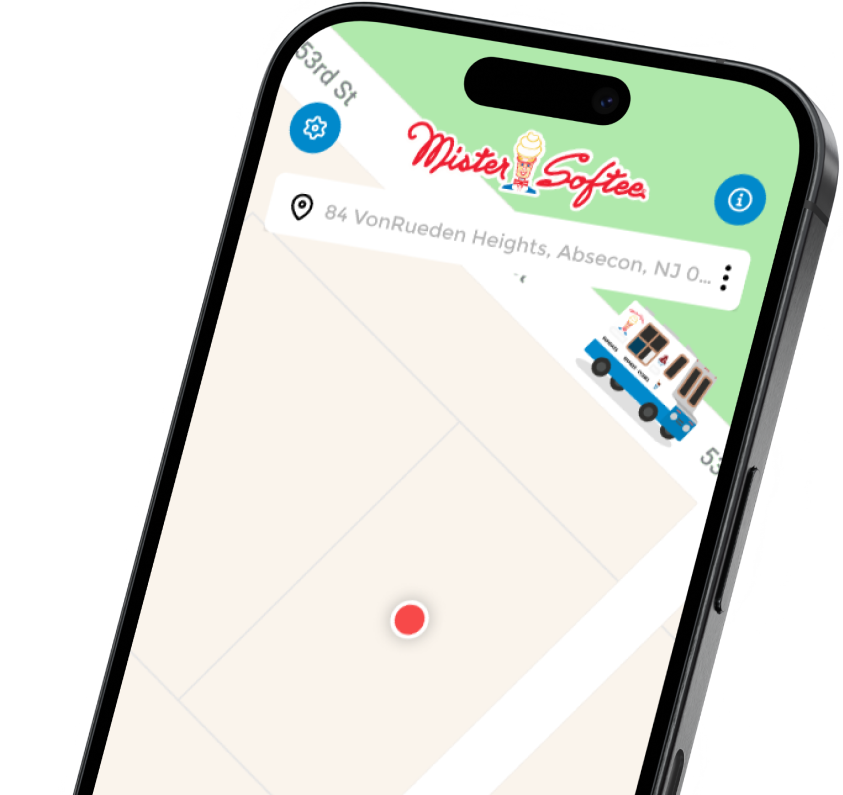
We’ve integrated Google’s location APIs in many projects. In the Mister Softee mobile app (for the iconic ice cream trucks), Google Maps integration allows users to find the nearest ice cream truck in real time on a map. The API handles the heavy lifting of map rendering and GPS coordination, so our team could focus on a fun user interface.
Similarly, for Pearson Fuels, we used Google Maps and the Places API to help users locate the nearest E85 fuel stations. This included showing station details, getting directions, and even filtering by amenities — all enabled through API calls to Google’s rich location databases.
While Google Maps is the dominant player, we’ve also worked with Apple Maps (for iOS-specific experiences and when clients prefer Apple’s ecosystem) and OpenStreetMap (OSM) for certain use cases. OSM, for instance, is a community-driven map data source that can be great for offline maps or niche datasets. We leveraged OSM data for a project in rural planning where Google’s info was sparse, integrating an OSM-based SDK to provide reliable local maps.
The key point is that no matter the mapping need — be it a simple embedded map or a complex geo-analytic feature — an existing API or SDK likely exists to serve it.
By integrating location services, you enhance user experience significantly. Users can visualize information contextually (“Oh, that’s where the store is”) and access convenient features like one-click navigation. For example, in the City of Peachtree Corners app we built for a smart-city initiative, we integrated mapping to display local points of interest and even real-time positions of the city’s autonomous shuttles. Residents can see where the shuttle is on a map and how long until it arrives — functionality delivered via an API tie-in to the vehicle tracking system.
This kind of real-time map visualization would have been incredibly complex to custom-build; using third-party map frameworks made it straightforward and reliable.
Another advantage: regular updates. Map providers constantly update road data, new businesses, changed addresses, and more. When you use their API, your app benefits from those updates automatically. This ensures your users always get the latest info without you lifting a finger.
Overall, integrating mapping APIs lets you offer rich, location-aware features that feel magical to users (like seeing an ice cream truck move on the map in real time), with a fraction of the effort it would take to build internally. No wonder maps integration is one of the most popular third-party adds — it brings your app experience into the real world.
4. Communication & Notifications (Twilio, OneSignal, Mailgun)
Staying connected with users is vital for almost any app. Whether it’s sending a verification SMS, a real-time chat message, an email confirmation, or a push notification to nudge users back into the app, communication features keep users engaged and informed.
Thankfully, developers don’t need to run their own mail server or SMS gateway — specialized APIs handle it. By integrating services like Twilio for SMS/voice, OneSignal or Firebase Cloud Messaging for push notifications, and SendGrid/Mailgun for email, you can add robust communication channels to your app with minimal fuss.
Push notifications in particular are a proven way to boost user engagement and retention. When used wisely (timely and relevant messages), push notifications can re-engage users who might otherwise drop off. Research shows that users who enable push have much higher retention: one analysis found push notifications can boost app engagement by 88%, and users who opted in were retained at nearly 2x the rate of those who didn’t over a three-month period.
We’ve seen this effect in projects like PetKey, a pet recovery app we developed. By integrating OneSignal for push notifications, the app alerts users immediately when a lost pet matching their criteria is spotted in their area. These real-time pushes are critical for engagement — they draw users back in (“Lucy the dog has been found 2 miles away!”) and prompt quick action. Thanks to OneSignal’s API, we easily set up segmented notifications and even scheduled reminders, which helped PetKey achieve a high return-user rate.
Likewise, SMS integration is invaluable for reaching users outside of the app or for critical alerts. With Twilio’s API, for example, our apps can send text messages or even automated voice calls anywhere in the world with a few lines of code. We incorporated Twilio into the Commute My Kids app (which coordinates safe carpooling for families) to send parents SMS alerts when their child’s ride was arriving or if any schedule change occurred. Since SMS has near-100% open rates, it was the best channel for urgent, short messages. Twilio handled the telecom connections and regulatory compliance; our app just triggered messages via their API.
Similarly, in Integrated Cash Logistics (an app for managing cash deliveries and pickups), we used Twilio to send one-time passcodes and delivery notifications to drivers and clients, adding an extra layer of security and assurance.
On the email side, integrating services like SendGrid or Mailgun takes the headache out of sending emails at scale. Transactional emails (password resets, receipts, newsletters) are still a major communication tool. But managing deliverability, spam compliance, and formatting across clients is a full-time job — so we let dedicated APIs handle it.
For example, HOA Doctor, a homeowners’ association management app we built, uses SendGrid to automatically email community announcements and monthly reports to residents. Because it’s an API integration, these emails are sent reliably and are less likely to end up in a spam folder. We also integrated Mailgun for another client’s app to send personalized onboarding emails to new users. Both services provide analytics — open rates, bounces, and more — which is data we can feed back into the app’s admin panel for our clients to monitor.
Incorporating notification and communication APIs has another huge benefit: real-time interactivity. Users expect instant feedback — say, a chat message that appears simultaneously on both sides of a conversation, or a notification right when something important happens. With the right APIs, even a small startup app can achieve this level of real-time responsiveness.
We often use a combination of these services to cover all bases. In CollabMind, a team collaboration platform we prototyped, we integrated push notifications (for immediate in-app alerts), Twilio SMS (for off-app alerts when something urgent needed attention), and email (for daily summaries and invites). This multi-channel approach, all enabled by third-party APIs, ensured users were always in the loop through their preferred medium.
The takeaway: Integrating communication APIs supercharges user engagement and trust. You can keep users informed, drive them back to your app, and facilitate conversations — all without building messaging infrastructure from scratch. And these services scale with you; whether you’re sending 100 or 1,000,000 messages, they can handle it. Our team’s experience with OneSignal, Twilio, Mailgun, and more means we can quickly weave robust communication capabilities into any app, keeping your users close and your operations running smoothly.
Get Your Free 45-Minute App Roadmap
Meet 1-on-1 with our senior product team. We’ll map your MVP or enterprise app and hand you a personalized plan—clear scope, a realistic timeline, and fixed monthly costs—for iOS & Android, web, tablets & wearables, and AI.
5. Social Media & Authentication (Facebook, Google, LinkedIn, etc.)
In a world where everyone’s connected, integrating social media features into your app can greatly enhance its appeal and reach. This can range from allowing users to log in via their social accounts (Facebook, Google, Apple, LinkedIn, etc.) to pulling in social content or enabling easy sharing from your app to social networks.
By using social platform APIs and SDKs, you can piggyback on the billions of user accounts already out there and remove friction from your user onboarding and sharing flows.
One of the most common and valuable integrations is Social Login — the “Sign in with Google/Apple/Facebook” buttons you see in many apps. Instead of forcing a new user to create yet another username and password (a process 86% of people dislike), you let them authenticate via a service they already use.
This is not just a convenience; it directly affects your conversion and retention. Research indicates that offering social login can boost sign-up conversion rates by 20–40% on average. The reason is simple: with a social login, registration becomes a one-tap action, and users don’t have to remember a new password. Additionally, you get verified user data (email, name) from the provider, which tends to be more accurate than self-entered data.
We’ve implemented social logins in many of our projects. For example, the RetireFIT wellness app we built allows users to sign in with Google or Apple ID, eliminating barriers for an older demographic who might struggle with traditional sign-ups. The outcome was a faster onboarding funnel and fewer drop-offs.
Likewise, CourseCaddie (a golfing app) let users sign up via Facebook or Google, which not only sped up onboarding but also enabled connecting with friends for golf rounds by pulling a Facebook friends list (with permission) via the Facebook Graph API.
Beyond login, social sharing and content integration can amplify your app’s presence. If users can easily share content from your app to their Instagram story or Twitter feed via an API, you gain free marketing. We often include one-tap share buttons that use native APIs for popular platforms — e.g., share a high score, a fitness achievement, or a real estate listing to Facebook/Twitter.
In one project, Zuma, a VIP restaurant app, we integrated Instagram’s API so that users could view the restaurant’s Instagram photos and even share their dining experience to their own profiles seamlessly. This kind of integration keeps users engaged by blending your app with their social life.
For OvercomingMS, a community app for people with multiple sclerosis, we included a feature for members to share their progress milestones on Facebook — using Facebook’s API, the app posts a formatted update (with user consent) celebrating, say, 100 days on the program. This not only delighted users but also attracted new sign-ups as those posts spread on social media.
Another valuable API use case is pulling in social feeds or profiles. For instance, if your app benefits from displaying a user’s LinkedIn information (perhaps in a job app or a networking context), the LinkedIn API can fetch profile details that the user consents to share. We did this with CollabMind, integrating LinkedIn OAuth to import a user’s professional info so they didn’t have to manually fill out their profile in the app. This made profile creation instantaneous and accurate.
Similarly, we integrated the Facebook Graph API in a nightlife app to show which of a user’s Facebook friends had also signed up — a great social proof and engagement driver.
Security and user trust are also enhanced with these integrations. Using Sign in with Apple, for example, not only simplifies login on iOS apps but also boosts privacy (Apple can relay an anonymous email if the user prefers). By adopting OAuth standards via these big providers, we ensure secure authentication flows audited by companies like Google and Apple.
In short, connecting with social platforms can supercharge user growth and engagement. It removes barriers to entry, provides rich data (with permission) to personalize the experience, and turns your users into advocates when they share content externally.
Our team has deep experience with the full spectrum of social APIs — from implementing single sign-on with Google/Apple (as in SeekQ, our Q&A platform that uses Google Sign-In for instant onboarding) to leveraging social feeds. We make sure to follow each platform’s branding and UX guidelines, so the integrations feel smooth and trustworthy. The result is an app that “plays nicely” in the social ecosystem, leading to happier users and organic growth.
6. AI and Machine Learning Integrations (ChatGPT, Claude, etc.)
Artificial Intelligence has quickly moved from a novelty to a must-have feature in many apps. Thanks to advanced AI APIs like OpenAI’s ChatGPT, Anthropic’s Claude, and others, you can now imbue your application with capabilities that were science fiction a few years ago — natural language understanding, content generation, image recognition, personalized recommendations, and more.
What’s amazing is that you don’t need a PhD in AI or a supercomputer cluster to do this; by calling these APIs, you’re effectively renting a world-class AI brain on demand.
Consider the impact of adding a conversational AI assistant to your app. Rather than a static FAQ or rigid scripted bot, an integration with ChatGPT’s API allows users to ask questions in natural language and get helpful answers in real time.
We implemented this in the SeekQ app — an educational Q&A platform — where users can pose any question and get an AI-generated answer (with sources) instantly. This dramatically increases user engagement because it feels like there’s a knowledgeable tutor available 24/7.
Another project, DietMeetings, uses an AI chatbot (via OpenAI API) to provide dietary advice and motivation between the live group sessions. The chatbot integration helped users stick to their programs, effectively scaling the support without needing human coaches around the clock.
The possibilities extend across industries. For instance, we built a prototype for CollabMind (a team collaboration tool) that integrated a GPT-5-powered meeting assistant. It could summarize discussions, answer questions about past meeting notes, and even draft follow-up emails. All of that was achieved simply by sending conversation data to an AI API and getting back a summary or recommendation.
Such features would have been impossible for a small team to build internally — but by leveraging generative AI services, even a startup app can have cutting-edge smarts. It’s no surprise that AI adoption has skyrocketed: as of 2025, 78% of companies report using AI in some form, and a majority are investing more into AI capabilities. Integrating AI via APIs is the fastest way to join that wave.
Beyond chatbots, there are APIs for recommendation engines (machine learning), image and speech recognition, language translation, and more. For example, a retail app can integrate an AI recommendation API to personalize product suggestions (“Customers like you also bought…”), boosting sales. A travel app might use a vision AI API to let users take a photo of a landmark and get info about it.
We worked on an app called FMHero that helps field technicians identify equipment parts: by integrating an image recognition API, the technician can snap a photo of a part and the app labels it and pulls up the repair manual — magic that we achieved just by leveraging an existing ML model via API.
An exciting area is AI content generation. Need dynamic content or copywriting? Tools like GPT-5 can generate personalized workout plans, meal recipes, or even financial reports on the fly. In RetireFIT, we added a feature where users can ask a built-in “retirement coach” (powered by an AI API) for explanations of complex investment terms or for suggestions on their retirement savings strategy. Users loved the interactive, personalized guidance, and it kept them engaged in the app far longer than a static content dump would.
Of course, with great power comes responsibility — we ensure that AI features are implemented with proper quality checks, user consent, and fallbacks if needed. Part of our expertise is knowing how to integrate these APIs in a way that feels helpful and on-brand (for example, tuning the AI’s tone or limiting its responses to safe, relevant content).
The bottom line: AI integrations can make your app feel truly smart and modern. And thanks to third-party APIs, you don’t have to build or train those AI models yourself; you can plug into the billions of dollars of R&D that companies like OpenAI, Google, and others have invested. This levels the playing field — a small app can deliver AI-driven features that rival those of tech giants.
Our team has hands-on experience with popular AI services (from OpenAI’s GPT models to Google’s ML Kit for on-device AI) and can seamlessly weave them into your app. The result? Features that wow users — like an app that understands your voice commands, answers your questions, and predicts your preferences — all achieved through the power of integration. It’s a thrilling way to extend functionality and keep your app on the cutting edge.
7. Real-Time and Multimedia (LiveKit, WebRTC, Streaming APIs)
As users demand more interactive and immersive experiences, apps increasingly need real-time multimedia capabilities: live video streaming, voice calls, real-time collaboration, and instant data syncing. Building a robust real-time infrastructure from scratch (especially for video or audio) is a herculean task — but fortunately, there are APIs and platforms that make it feasible.
By integrating services like LiveKit, Twilio Video, or leveraging open standards like WebRTC through managed SDKs, we can add live communication features to apps with surprisingly low effort.
Live video and audio are prime examples. Imagine a fitness app with live workout classes, a telehealth app connecting patients to doctors via video, or even a simple one-to-one video chat inside a marketplace app so buyers and sellers can communicate. All of this can be achieved by integrating a real-time communications API.
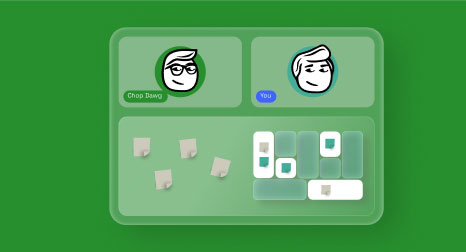
We utilized LiveKit (an open-source WebRTC platform) for the DietMeetings app to enable group video meetings directly within the app. Users could join weekly support group sessions with video and audio, see each other in a gallery view, and chat — all powered by LiveKit’s SDK. We didn’t have to handle the low-level networking; LiveKit provided the media server and negotiation logic. The result was a smooth video conferencing feature, similar to Zoom or Google Meet, but embedded in a niche app experience. This kept users engaged on our client’s platform rather than using external tools.
Another project, CourseCaddie, benefited from real-time features by integrating a live scoring and chat function for golfers. We used a combination of WebRTC data channels and push notifications so that as a group of golfers played a round, their scores and messages updated instantly on everyone’s devices. This kind of synchronized, live data update makes the app feel responsive and social.
Again, building a real-time backend from scratch would have been complex, but by using a managed real-time database and WebSocket service, we implemented it quickly and reliably.
If your app needs to broadcast to many viewers (one-to-many streaming), there are also APIs for that — e.g., YouTube Live and Facebook Live have APIs, or services like Wowza and Vimeo offer SDKs for streaming. In one case, a client wanted to host live webinars within their app (with potentially hundreds of viewers). We integrated an SDK from a streaming service that handled the video encoding and content distribution network (CDN) scaling. All we had to do was embed the player in the app and provide the stream key. This allowed our client to run polished live events in-app, complete with live Q&A and reactions, without us reinventing livestream tech.
Real-time collaboration is another area supercharged by APIs. Consider features like Google Docs-style live editing or multiplayer gameplay updates. Firebase and similar platforms offer real-time databases that sync changes across clients within milliseconds. We’ve used Firebase for features like collaborative to-do lists in a productivity app — two users could check off items and see updates immediately.
Another example: in CollabMind, implementing a shared whiteboard that multiple team members can draw on simultaneously was made possible by using a real-time drawing API (leveraging WebSockets under the hood).
For apps requiring integration with hardware or IoT in real time (say, a live feed from a camera drone or a smart home device), APIs again are the bridge. We integrated a live video feed from an IoT camera in a security app using the device manufacturer’s API — the app could display the camera feed with only minor processing on our side.
The key takeaway: real-time features are highly engaging — they make your app feel alive and interactive — and they’re within reach thanks to third-party services. By using proven APIs for video calling, streaming, or real-time data sync, you don’t have to solve for latency, packet loss, scaling servers, and other complexities; the service does that. Our experience includes working with LiveKit, Twilio (Programmable Video and Voice), Socket.io/WebSockets, Firebase Realtime Database, and others to deliver snappy real-time experiences. Users increasingly expect instant feedback and live interaction, and by integrating these capabilities, we meet those expectations. This keeps users on your app longer and opens the door to entirely new functionalities (like live events, support chats, and interactive features) that can set your product apart.
8. Industry-Specific & Enterprise Integrations (POS Systems, EMRs, and More)
Not all third-party integrations are about global tech giants. Many businesses benefit from connecting to industry-specific platforms or their own enterprise systems. For example, a retail or restaurant app might need to tie into a Point-of-Sale (POS) system to pull inventory or send orders. A healthcare app might integrate with an Electronic Medical Records (EMR) system to fetch patient data. These integrations can be incredibly powerful, as they connect your custom app to established workflows and data sources, eliminating double-entry and ensuring consistency across systems.
Our team has extensive experience in this area. In the hospitality domain, we integrated with the NCR Aloha POS for a restaurant client’s app. The client, Zuma Restaurants, operates high-end dining and wanted their VIP concierge app (called Unome) to sync with what was happening in the restaurant. By integrating directly with Aloha’s API, the app could retrieve reservation info and send special requests from VIP patrons straight to the restaurant’s system. This meant a guest could, say, pre-order their favorite wine from the app, and it would appear in the restaurant’s order queue as if a staff member entered it. The integration we built effectively bridged the mobile user experience with the restaurant’s existing backbone, creating a seamless VIP service.
For Kitchen Stage, a platform for cooking show enthusiasts, we integrated grocery store APIs so users could tap a recipe ingredient and add it to a shopping cart at their preferred grocer — tying into grocery retailers’ systems behind the scenes.
In healthcare, EMR integrations are game-changing but require careful handling of data and privacy. We worked on an app for a regional health provider (Toiyabe Health), where we integrated with their EMR (using HL7/FHIR standards) so patients could view their lab results and appointment notes right in the app. This spared the health staff from manually re-entering data and gave patients real-time access to their records.
Similarly, for OvercomingMS — which helps users follow a health program — we integrated with Apple HealthKit and Google Fit to pull in activity and diet data, allowing the app to automatically log progress when users exercise or log meals in other apps. By connecting to these existing health data systems, we made OvercomingMS more convenient and insightful, while keeping data consistent across platforms.
Financial services often require integrating with banking or fintech APIs. We utilized Plaid in a personal finance app so that users could securely connect their bank accounts, and the app could display their transaction history and balances without anyone scraping passwords. Plaid handles the connections to thousands of banks, so our app simply receives the normalized financial data — a task that would’ve been impossible to support internally. In one of our retirement planning apps, this meant users could link their retirement accounts and see all their assets in one dashboard, updated automatically. The integration boosted user engagement because the app became a one-stop shop for their financial overview, thanks to real-time data from Plaid.
Enterprise software integration can also include CRM systems (Salesforce, HubSpot), ERP systems, or specialized tools a company already uses. We’ve helped clients integrate their apps with Salesforce to push leads captured in the app directly into their sales pipeline. For a logistics company, we integrated with their fleet tracking API so that the mobile app could show delivery statuses and truck locations on a map, pulling data from the existing telematics system.
When we built Integrated Cash Logistics’ solution, we connected it to their armored truck scheduling system and bank vault inventory database through secure APIs — this eliminated paper trails and errors, and any update in one system was reflected in the app in near real time.
The importance of these integrations cannot be overstated: they streamline operations and prevent data silos. Businesses run on many software tools, and when those tools talk to each other, efficiency soars. On the flip side, lack of integration can be very costly — one report found that 57% of IT decision-makers estimate their companies lose up to $500,000 per year due to poor or missing system integrations. That’s half a million dollars lost in productivity, errors, and missed opportunities because systems aren’t connected.
We take that to heart when designing solutions. By ensuring the app we deliver plugs into our client’s critical systems (whether via official APIs or even custom-built connectors), we help eliminate duplicate data entry, reduce errors, and speed up workflows.
For example, C.A. Short — an employee recognition company — had us develop an app that needed to pull data from their legacy employee rewards database. We created a middleware API that translated the old system’s data into a modern REST API the app could consume. Now, when a user redeems reward points in the app, it’s instantly recorded in the company’s core system too. No batch uploads, no manual reconciliation.
The same concept applied to HOA Doctor: soon through the app, it will allow users the ability to integrate directly with QuickBooks via an API to auto-record HOA dues payments made through the app.
By tackling industry-specific integrations, we essentially future-proof the app to fit into the user’s or business’s existing ecosystem. It’s not a standalone island; it becomes a connected part of their operations. Our experience spans POS systems, EMRs/EHRs, CRMs, payment terminals, IoT device APIs, and more. Whatever unique system your app needs to talk to, we can likely make it happen.
The end result is an app that not only provides great standalone features, but also elevates the efficiency of the entire business by syncing with other tools. This holistic approach sets us apart — we understand that a successful app often acts as a hub, uniting various services into one coherent user experience.
Conclusion
Integrating third-party APIs is one of the smartest ways to extend your app’s functionality and deliver more value to users without reinventing the wheel. As we’ve highlighted, nearly every aspect of modern apps — payments, maps, communications, social logins, AI, real-time features, industry-specific systems — can be enhanced by plugging into proven services.
The benefits are clear: faster development, lower costs, improved reliability, and access to world-class capabilities. In essence, APIs allow your app to do more with less effort. No wonder the API economy is booming toward a forecasted $267 billion market by 2025.
Crucially, these integrations don’t just make your app more powerful on paper — they tangibly improve user experience. Think of how frictionless a one-tap Apple Pay purchase feels (versus typing card details), or how engaging a live chat or personalized recommendation can be. By meeting users where they already are (on platforms they already use) and bringing those services into your app, you create a familiar yet enriched experience. Users don’t have to jump out to other apps or deal with clunky workarounds; it’s all seamlessly woven in. That translates to higher satisfaction and loyalty. Studies show APIs can boost customer satisfaction by around 20% — likely because things “just work” in a connected way.
At the same time, integrations can supercharge your business. They can open new revenue streams (e.g., subscriptions via RevenueCat, or usage-based billing via cloud APIs), provide invaluable data (analytics from social logins or IoT devices), and ensure your app scales and stays secure by offloading heavy tasks to specialists. Businesses that leverage APIs strategically are reaping the rewards — higher profitability, faster innovation, and happier customers.
Of course, executing these integrations correctly requires expertise. Every API has its quirks, and combining multiple services smoothly is an art in itself. This is where our team’s experience sets us apart. We’ve successfully integrated APIs of all shapes and sizes across hundreds of projects — from mainstream ones like Stripe, Google Maps, and Twilio to niche and proprietary ones in healthcare, finance, and retail.
Apps that we’ve created here at Chop Dawg such as like Mister Softee, Zuma, PetKey, ForeveRx, Pearson Fuels, Commute My Kids, OvercomingMS, CRBO, Kitchen Stage, SeekQ, Aurio, Tix4Cause, HOA Doctor, C.A. Short, RetireFIT, Toiyabe, DietMeetings, CourseCaddie, CollabMind, and Innovative Vending Solutions — to name just a few of our 500+ recent success stories — have all benefited from our integration know-how. Each one presented unique requirements, and in each case we found the right third-party services to deliver the needed functionality elegantly and reliably.
In summary, third-party API integrations are the key to building feature-rich apps fast and staying ahead of the competition. Instead of doing it all alone, you can leverage the best tools out there and focus your energy on what makes your app special. The result is an application that feels modern, connected, and capable of doing just about anything your users expect.
Need help connecting your app to powerful third-party services? That’s our specialty. We’ve spent nearly two decades integrating APIs and crafting custom web and mobile apps that seamlessly merge multiple technologies into one cohesive product. Whether you need payment processing, social integrations, AI features, or a link to an obscure legacy system, we’ve likely done it before (or we’ll figure it out fast). Let us handle the heavy lifting of integration so you can focus on your vision.
Contact us for a free consultation, and let’s discuss how we can extend your app’s functionality through expert API integrations. With our experience and your ideas, we’ll create an app that not only stands out in 2025, but also delivers the comprehensive, connected experience your users crave.



 18 Min