 10 Min

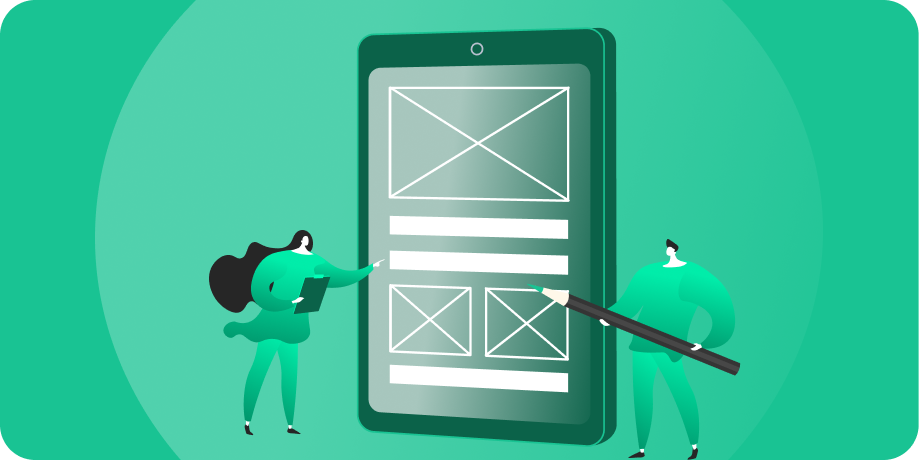
Wireframes, high-fidelity designs, and clickable prototypes are three distinct stages of app design, and each has a job: wireframes settle the logic in black-and-white, high-fidelity designs add the real visuals, and prototypes let you click through and test the experience before anyone writes code. Getting the logic right on screen first is far cheaper than fixing it later. According to data widely cited from the IBM Systems Sciences Institute, a defect caught after release costs up to 100 times more to fix than one caught in the design phase. This guide explains what each stage is for, why design happens before development, and how the three fit together.
Key Takeaways
- Wireframes lock the logic and layout in black-and-white, before color or branding enters.
- High-fidelity designs add real visuals, typography, and brand so you see the finished look.
- Clickable prototypes simulate the experience so you can test flows before code begins.
- Design before code is cheaper: fixing a flaw on screen costs a fraction of fixing it after launch.
- Skipping straight to development is the most expensive shortcut in app building.
The Three Stages, and What Each One Does
These three artifacts are easy to confuse, but they answer different questions at different moments. Used in order, they take you from raw logic to a tested, build-ready experience without writing a single line of code. Here is what each one is for.
Wireframes: Logic First, in Black-and-White
Wireframes are the skeleton. They are deliberately stripped of color, images, and branding so everyone focuses on one thing: does the logic work? Where does each button lead, what information lives on each screen, and how does a user move from start to finish? By keeping wireframes plain, you argue about structure instead of getting distracted by whether the blue is right. Settling the logic here, in the cheapest possible medium, is the entire point.
High-Fidelity Designs: The Real Look
Once the logic is approved, high-fidelity designs add the skin: real colors, typography, imagery, spacing, and brand. This is where the app starts looking like the finished product, pixel for pixel. Because the structure is already locked, designers can focus purely on making it beautiful and on-brand, rather than relitigating where things go. What you sign off on here is what gets built.
Clickable Prototypes: The Experience, Before Code
A clickable, non-functional prototype (NFP) links the high-fidelity screens together so you can tap through the app as if it were live, even though no functional code exists yet. You feel the flow, catch awkward transitions, and test it with real users before development starts. It is the closest thing to using the finished app without the cost of building it, which makes it the perfect place to find and fix experience problems.

Get Your Free 45-Minute App Roadmap
Meet 1-on-1 with our senior product team. We’ll map your MVP or enterprise app and hand you a personalized plan—clear scope, a realistic timeline, and fixed monthly costs—for iOS & Android, web, tablets & wearables, and AI.
Wireframes vs High-Fidelity Designs vs Prototypes
| Stage | What It Is | Question It Answers | When It Happens |
|---|---|---|---|
| Wireframe | Black-and-white layout and structure | Does the logic and flow make sense? | First, after personas and sitemap |
| High-fidelity design | Pixel-perfect visuals and branding | Does it look like the finished product? | After wireframes are approved |
| Clickable prototype | Linked screens you can tap through | Does the experience feel right? | After high-fidelity designs are done |
For a closer look at how these fit a full engagement, see our UI/UX design and prototyping services and browse our design and prototyping hub.
Why Design Happens Before a Line of Code
It is tempting to rush into development, because code feels like real progress. But changing a screen in a design file takes minutes; changing it after it is built takes a developer hours or days of rework, and changing it after launch can mean costly patches and frustrated users. The cost of fixing a problem climbs steeply the later you catch it, which is exactly why the smart move is to find problems on screen, where they are cheap.
Designing first also means you and your stakeholders see and approve the actual experience before money goes into engineering. There are no surprises at the demo, because you signed off on the prototype. Logic gets settled in black-and-white, visuals get layered on top, the whole thing gets tested as a clickable prototype, and only then does code begin, building something everyone has already agreed on.
How Chop Dawg Designs Before Building
We are Chop Dawg, a United States-headquartered and United States-led app development partner founded in 2009 with an in-house Brazilian design team, and we run this exact sequence on every project: user personas, then a sitemap, then black-and-white wireframes, then pixel-perfect high-fidelity designs, and finally an NFP you can test before we write a line of code. American product, project management, and senior design leadership work directly with that Brazilian design team and our in-house development and quality-assurance teams in Pakistan and India, all in-house with no middleman, and you review every step over weekly design Zooms in shared Figma. You see and approve the full experience first, so development builds something proven rather than something hoped for.
Since 2009 we have launched more than 500 products reaching over 1 billion users, with a 92% partner retention rate and 300+ five-star reviews across trusted directories like Clutch and GoodFirms. This design-first process is how we delivered the full set of wireframes, high-fidelity prototypes, and a complete interactive Figma prototype for the BiDR collectibles marketplace before development began. See the full sequence in our proven process.
Frequently Asked Questions
Why are wireframes in black-and-white?
Color and branding distract from the only question wireframes need to answer: does the logic work? In plain gray boxes, everyone focuses on structure, flow, and what lives on each screen. Settling those decisions before visuals enter keeps reviews productive and prevents debates about color from derailing decisions about function.
Is a prototype the same as a working app?
No. A clickable prototype links screens so you can tap through the experience, but it has no functional code behind it. Nothing is saved, no data moves, and no real logic runs. It looks and feels like the app, which is exactly what makes it perfect for testing flows before development.
Can I skip wireframes and go straight to high-fidelity?
You can, but it usually costs more. Reworking logic inside a polished, fully branded design is slower and pricier than rearranging plain wireframes. Wireframes exist to make structural changes cheap. Skipping them tends to bury logic problems under visuals, where they are harder to spot and more expensive to fix.
Why not just start coding to save time?
Because changing code is far more expensive than changing a design file. Fixing a flaw after launch can cost many times what it would have cost to catch on screen. Designing first lets you find and resolve problems while they are cheap, then build something everyone has already reviewed and approved.
How long does the design phase take?
It depends on the app’s complexity, but design is a meaningful share of a quality build, not an afterthought. Rushing it to reach code faster usually backfires, since unresolved design problems resurface as expensive development rework. Treat design as the stage that de-risks everything that follows, because that is what it does.
Do users really get tested on the prototype?
Ideally, yes. Putting a clickable prototype in front of real users before development reveals confusing flows and friction points while they are still cheap to fix. It is one of the highest-value steps in the whole process, because it validates the experience with actual people instead of internal assumptions.
Design Your App the Right Way, From the Start
Whether you are a startup designing a first app or an established company redesigning an existing product, if you want an app that is tested and approved before a line of code is written, we would love to show you how. Book a free 45-minute consultation, and we will walk you through our design-first process and how it protects your budget, with no obligation. Explore our design services or browse our success stories to see the results.



 21 Min